Introducing 60+ Marketplace templates and department packs
Most automation projects die before they ship. Not because the tech is wrong. Because the starting point is. Gravitre's Marketplace template library fixes that.
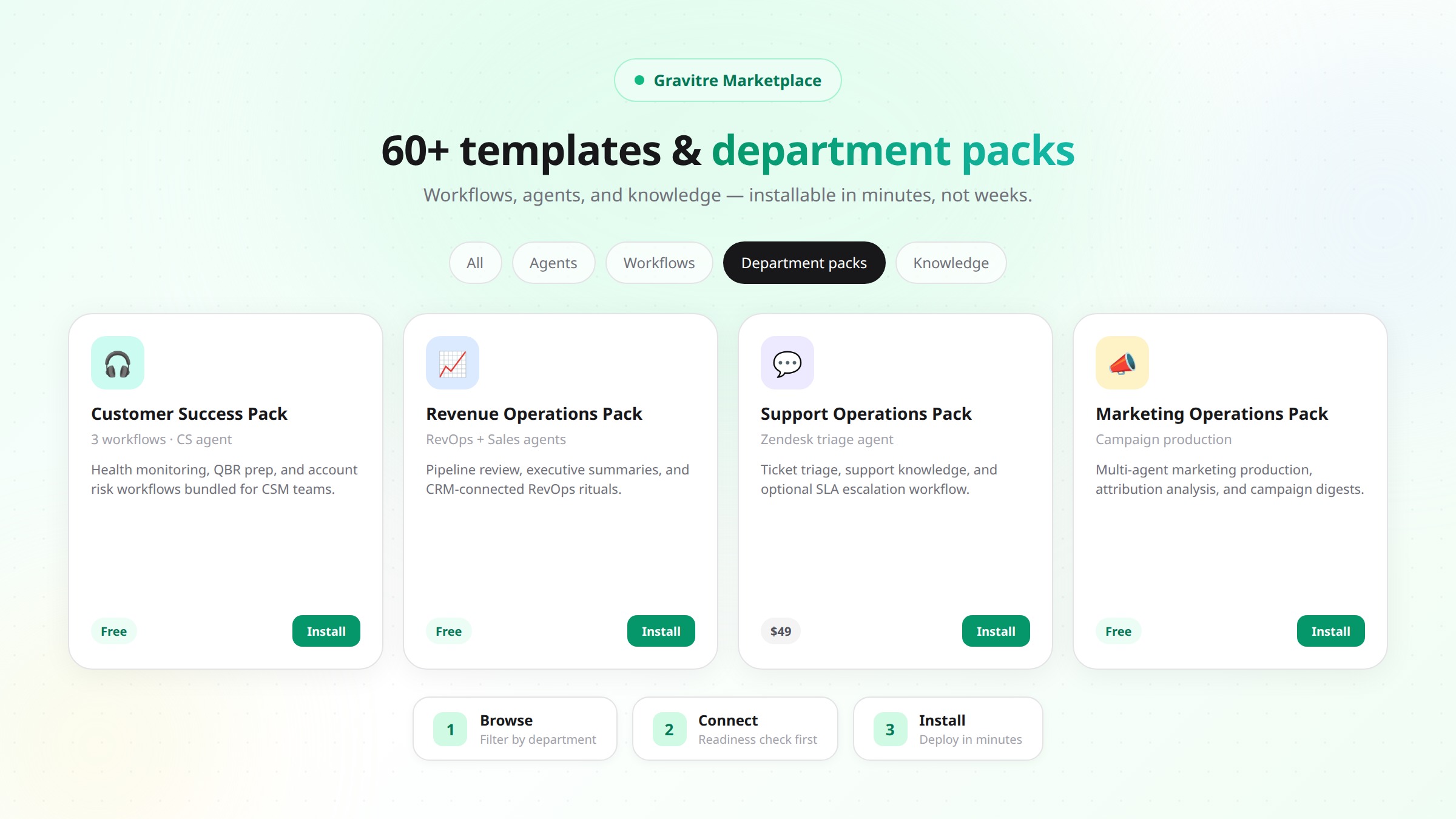
Stop building from scratch. Start from what works.
Most automation projects die before they ship. Not because the tech is wrong. Because the starting point is. A blank canvas feels like freedom. In practice, it is a reason to delay, over-build, and quietly abandon something that should have taken an afternoon.
Gravitre's Marketplace fixes that: 60+ starter catalog assets — including 19 workflow templates and 6 department packs — plus agents and knowledge packs, organized by department, ready to install and run. Minutes, not weeks.
Here is what is in the library today, how install actually works, and where we are honest about what is still hardening.
A useful template needs a way to test its connections before anything changes in a live system. Microsoft's Power Automate tutorialdemonstrates creating, testing, and running a cloud flow. The HubSpot CRM API referencedescribes the records and authenticated operations behind CRM integration. Both show why a template still needs correct connector permissions and a real test before use.
What a template actually is
Not a mockup. Not a skeleton you rebuild. In Marketplace terms, you will install one of:
- Workflow templates — executable sequences of actions and conditions with declared connector requirements.
- Department packs — a single install that bundles agents, workflows, and knowledge for a business function (for example Revenue Operations or Customer Success).
- Agents and knowledge packs — the building blocks packs assemble, also browsable on their own.
Packs are often the fastest path: one card shows what is included, which apps you need, and whether you are ready to install.
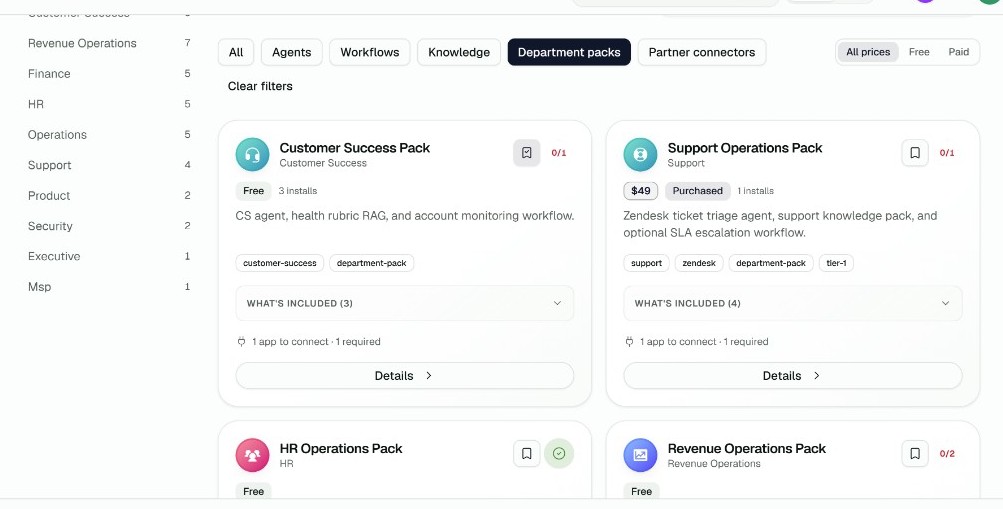
Browse the full catalog at /marketplace/assets. Prefer packs? Filter Department packs. Prefer bare workflows? Filter Workflows. Step-by-step install guidance lives in the Marketplace how-to and the Marketplace concepts doc.
Where the real guarantee lives
Every write action Gravitre takes — a CRM update, a ticket change, a document send — is checked against org Approvals policy and platform write authority derived from the action catalog. That check does not live as a one-off setting inside a single blog-listed template. It sits underneath writes, whether they started in chat or in a workflow run.
After you install, review Approvals for write steps on the workflow you deployed. We do not claim every seed workflow embeds a visible “approval node” in its graph. We do claim writes are not supposed to bypass the platform gates — and when we find a gap on a path (including canvas), we fix it and only then call it done. See also our security-first write-authority post.
The library (what ships today)
Counts below are the Gravitre starter catalog — real slugs in the Marketplace seed, not a roadmap wishlist. Department facets in the UI (Sales, Finance, HR, Security, Executive, and more) help you browse; the six department packs are the bundled “install the outcome” entry points.
Department packs
- Revenue Operations Pack — RevOps + Sales Pipeline + CFO agents, Executive Summary workflow, RevOps knowledge.
- Marketing Operations Pack — multi-agent marketing production and handoffs.
- Customer Success Pack — CS agent, health monitoring workflow, CS knowledge.
- Support Operations Pack — ticket triage agent, support knowledge, optional SLA escalation (paid tier available).
- HR Operations Pack — people-ops agents and onboarding checklist workflow.
- MSP Operations Pack — MSP-oriented agents, workflows, and knowledge.
Sales and revenue operations
HubSpot Lead Qualification
Scores and qualifies inbound HubSpot leads against your ICP signals before routing.
Connects: HubSpot. Open in catalog: hubspot-lead-qualification.
Lead Routing Automation
Routes qualified leads to the right owner with CRM updates and team notification patterns.
Connects: CRM + collaboration tools declared on the asset. lead-routing-automation.
Salesforce Pipeline Review
Pipeline review workflow for Salesforce-backed RevOps rituals.
Deal Desk Approval Flow
Structured deal-desk path for pricing and exception review before a deal moves forward.
Executive Summary Generation
Produces an executive-ready summary from connected RevOps context (included in the RevOps pack).
Weekly Team Status Report
Scheduled team status digest — the closest starter to a “weekly business digest” for operators who want a Monday-ready rollup.
Marketing operations
Marketing Campaign Production
Campaign production workflow wired to marketing agents and connectors.
Marketing Attribution Analysis
Attribution analysis across campaign and CRM signals.
Campaign Performance Digest
Recurring campaign performance digest for marketing ops.
Competitive Intelligence Monitoring
Ongoing competitive monitoring workflow.
Customer support and success
Zendesk Ticket Triage
Classifies and routes Zendesk tickets using the support triage agent patterns.
Customer Health Monitoring
Watches account health signals and surfaces risk for CSMs.
QBR Preparation Workflow
Assembles QBR prep inputs so the meeting is not a scavenger hunt.
SLA Breach Escalation
Escalates when SLA thresholds are at risk or breached.
HR, finance, product, and security
New Hire Onboarding Checklist
Checklist-driven onboarding workflow for people ops.
Invoice Exception Review
Flags invoice exceptions for finance review.
Monthly Executive Reporting
Monthly executive reporting package from connected systems.
Product Feedback Synthesis
Synthesizes product feedback for ops and product partners.
Security Access Review
Access review workflow for security and compliance rituals.
How templates get maintained
Catalog assets are versioned in the Marketplace data model. If you publish org-owned assets, version history and rollback are available to org admins. Gravitre platform catalog installs do not silently rewrite themselves under you — you install deliberately, and you manage what is deployed from Installed.
When a connector API or pack improves, we ship catalog updates. You decide when to install the newer asset. That is slower than auto-update — and safer for production ops.
Installing one
Three practical steps — matching the product, not a brochure:
- Preview. Open the asset (or pack) detail page. Read description, what's included, and required apps. Packs show agents, workflows, and knowledge in one list.
- Connect. Gravitre runs an install check against connectors you already have. Missing required apps block install and show Connect links — before anything is deployed.
- Install. Confirm install (purchase first if the asset is paid). Open the deployed workflow or agents from the success state or Installed. Configure environment-specific details on the deployed assets as needed.
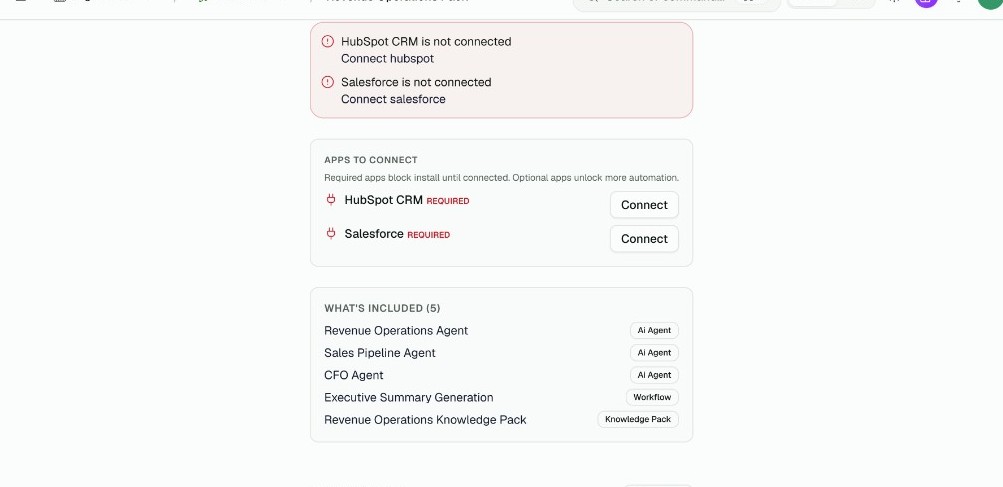
Catalog cards also show readiness pills like N/M apps connected so you see gaps before you even open Details. Connect integrations from /connectors or follow Connect integrations.
Bookmark candidates with Save, then review them under Saved before you install.
What templates don't do
Worth saying plainly.
Every org's data model is a little different. Your deal stages are not named the same as anyone else's. Install gets you the sequence and connector wiring; you still own environment configuration, Approvals policy, and the last mile of naming. Some workflows need tweaking after install. Expected.
What templates kill is the blank-page problem. The sequence is designed. The connectors are declared. The platform write gates still apply. You are configuring and governing — not architecting from zero.
Where to start
Filter by department, asset type, or price in Marketplace → Assets.
Not sure? Start with the Revenue Operations Pack if you live in CRM, or Weekly Team Status Report if you want a lightweight scheduled digest. Ten minutes of connect + install beats a month of whiteboard architecture.
Browse the library in the Gravitre Marketplace. Install walkthrough: Install from the Marketplace. Publish your own: Publish Marketplace assets.
Frequently asked questions
- What is a Gravitre workflow template?
- An installable Marketplace workflow with pre-built steps and declared connector dependencies. Department packs go further: they bundle agents, workflows, and knowledge for a function in one install.
- Do installed templates update automatically?
- No. Browse and install from the catalog when you are ready. Org-owned assets you publish yourself support version history and rollback in org admin. Platform catalog installs are managed from Installed — they do not silently auto-update under you.
- What if I am missing a connector?
- Before install, Gravitre runs an install check against required connectors. Missing apps show on the asset page with Connect links — including which ones are required vs optional — so you do not discover gaps mid-run.
- Can an approval step get skipped?
- Write actions are gated by org Approvals policy and platform write authority derived from the action catalog — not by hoping each template remembered to add a gate. Review Approvals for write steps after install. We publish guarantees only for paths we have verified in production.
Give your team the time back to do the work only they can do.
Gravitre's AI agents absorb the administrative drag, with a human always in the loop, so your people can focus on strategy, creativity, and relationships.
Get started