Connectors link Gravitre to external SaaS tools — CRM, support, dev platforms, finance, Google Workspace, email, and more. Workflows, agents, Gravitre AI (Execute mode), and Marketplace assets invoke Connector actions only when the integration is connected, healthy, and authorized in the active Environment.
Open Connectors
Sidebar → BUILD → Connectors (/connectors).
Add a Connector
- Browse the catalog or search by vendor
- Click Connect
- Complete OAuth (redirect flow) or enter API key / service account fields
- Wait for status Connected
- Optional: run Sync now to pull initial metadata
OAuth vs API key
| Method | Typical vendors | Notes |
|---|---|---|
| OAuth | HubSpot, Salesforce, Google, GitHub | Tokens refresh automatically when configured |
| API key / PAT | PagerDuty, some dev tools | Rotate on leak; store in Connector config only |
| SMTP / IMAP | See Email integration |
Connector lifecycle
Not connected → Connected → Syncing → Healthy
                    ↓
              Error / Degraded → Reconnect or rotate credentials
Status appears on the Connector list and in Metrics / Enterprise Integration health summaries.
Every state in that diagram is visible at a glance on the Connectors screen — below, two connectors are healthy, one is in Error, and one is mid-sync:
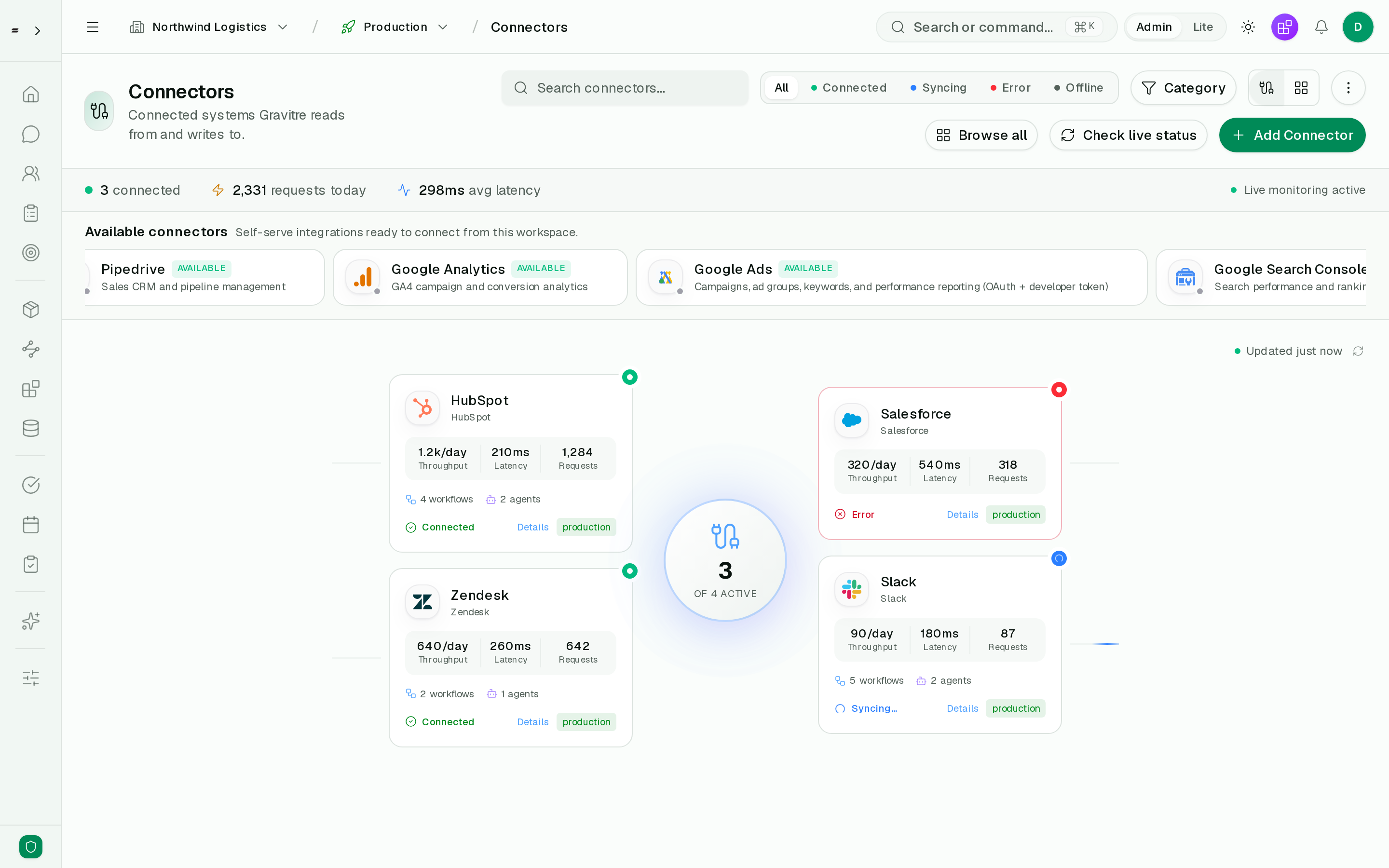
Because the strict execution policy is per-environment, the production chip on
each card matters: a connector that is healthy in staging but in Error here
will cause production steps to be analyzed and skipped rather than executed.
Use in workflows and agents
After connection:
- Workflow builder — Connector actions appear in the step picker
- Agents — tools list includes vendor operations
- Gravitre AI (Execute mode) — context packs load connector health and related workflows
- Marketplace — install checks pass when required Connectors are connected
Strict execution policy
Actions execute only when the Connector is healthy in the active environment. Runs label steps that were analyzed but not executed due to missing auth or approval.
Sync and health
Manual sync
UI: Connector detail → Sync now
curl -s -X POST "https://gravitre.app/api/connectors/CONNECTOR_ID/sync" \
  -H "Authorization: Bearer YOUR_API_KEY"
Health checks
- Last sync timestamp and error message on detail page
- Metrics — connector error counts over time
- Failure alerts — workflows depending on degraded connectors rank higher risk
- Enterprise Integration health — org-wide snapshots (
GET /api/enterprise/integration-health)
Operator context
Debug a Connector from Gravitre AI (Execute mode) by attaching Connector context:
curl -s "https://gravitre.app/api/operator/context/connector/CONNECTOR_ID" \
  -H "Authorization: Bearer YOUR_API_KEY"
Returns config summary and related workflows.
Sources vs Connectors
| Connectors | Sources | |
|---|---|---|
| Purpose | Act on SaaS APIs (create, update, notify) | Query databases, warehouses, file stores |
| Nav | BUILD → Connectors | BUILD → Sources |
| Docs | This guide | Connect Sources |
Many automations use both — Connector writes CRM records; Source supplies analytics SQL.
Partner Connections
Organizations with Partner Connections enabled can install federated connectors from Marketplace → Partner connectors. See Partner Connections.
Production-ready integration guides
Step-by-step setup for production-ready vendors:
| Vendor | Guide |
|---|---|
| HubSpot | Setup |
| Salesforce | Setup |
| Jira | Setup |
| PagerDuty | Setup |
| GitHub | Setup |
| Google Workspace | Setup |
| QuickBooks | Setup |
| Odoo | Setup |
| Zendesk | Setup |
| Email (SMTP) | Setup |
Troubleshooting
| Symptom | Likely cause | Fix |
|---|---|---|
| Error status after OAuth | Insufficient scopes | Reconnect; accept all requested scopes |
| Sync stale | Token expired | Reconnect or rotate API key |
| Workflow step skipped | Wrong environment | Connect same vendor in staging and production if needed |
| 429 rate limits | Vendor throttling | Add delays in workflow; reduce schedule frequency |
| Marketplace "N/M apps connected" | Missing prerequisite | Connect listed vendors before install |
Security practices
- Use least-privilege OAuth scopes supported by your use case
- Rotate API keys after team member offboarding
- Restrict Connector admin actions to Admin role
- Review Connector changes in History (
/audit)
API
# List connectors
curl -s "https://gravitre.app/api/connectors" \
  -H "Authorization: Bearer YOUR_API_KEY"

# Get connector detail
curl -s "https://gravitre.app/api/connectors/CONNECTOR_ID" \
  -H "Authorization: Bearer YOUR_API_KEY"

# Trigger sync
curl -s -X POST "https://gravitre.app/api/connectors/CONNECTOR_ID/sync" \
  -H "Authorization: Bearer YOUR_API_KEY"
See OpenAPI for create, update, and disconnect endpoints.