The Approvals queue holds steps that require human confirmation before execution — CRM writes, financial actions, bulk deletes, and any step your org policy flags.
Open Approvals
Sidebar → ACTIVITY → Approvals (/approvals). Pending items also surface on Runs detail and in Lite mode when enabled.
When approvals trigger
| Source | Example |
|---|---|
| Workflow policy | Production writes need owner approval |
| Expert Review node | Human checkpoint mid-graph |
| Gravitre AI (Execute mode) | Suggested action with approvalRequired badge |
| Agent tool call | High-risk connector operation |
Runs show approvalStatus: pending, approved, rejected, or not_required.
Review flow
- Open a pending approval from the queue or run detail
- Read context — workflow name, step, proposed payload, affected Connector
- Verify environment (staging vs production)
- Approve to continue the run or Reject with a reason (logged to History)
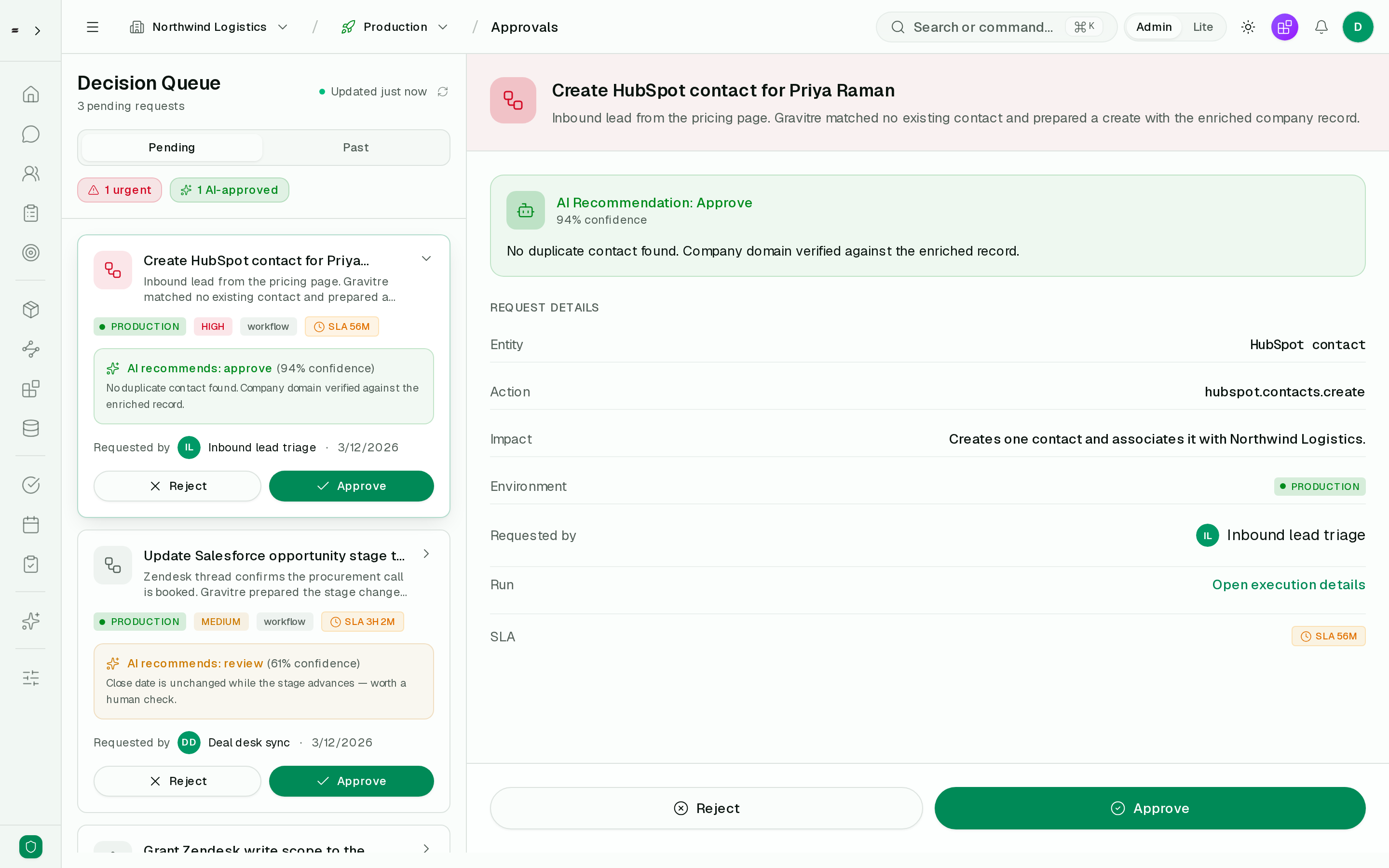
Note the AI recommendation is advisory — it carries a confidence score and its reasoning, but the run still waits for a human. A low-confidence item (the 61% Salesforce stage change above) is surfaced as review, not auto-approved.
Production writes
Approving in production may immediately invoke vendor APIs. When unsure, reject and test the same workflow in staging first.
Roles
Who can approve depends on org RBAC — commonly Owner, Admin, or roles named in workflow policy (approverRole). Members may submit runs but not approve production writes.
Notifications
Configure channels under Settings → Notifications (email, Slack, etc.) so approvers are alerted when:
- A run enters
approvalStatus: pending - Approvals sit unanswered past SLA thresholds (when configured)
Bulk and SLA practices
- Assign a daily approver rotation for high-volume orgs
- Reject stale approvals after workflow version changes — retry run on new version
- Use Metrics to track approval turnaround time indirectly via failed/pending runs
API
List pending:
curl -s "https://gravitre.app/api/approvals?status=pending" \
  -H "Authorization: Bearer YOUR_API_KEY"
Approve from run:
curl -s -X POST "https://gravitre.app/api/runs/RUN_ID/approve" \
  -H "Authorization: Bearer YOUR_API_KEY" \
  -H "Content-Type: application/json" \
  -d '{"approved": true, "comment": "Verified deal amount"}'
Reject:
curl -s -X POST "https://gravitre.app/api/runs/RUN_ID/approve" \
  -H "Authorization: Bearer YOUR_API_KEY" \
  -H "Content-Type: application/json" \
  -d '{"approved": false, "comment": "Wrong environment"}'
See OpenAPI for approval-specific routes and schemas.
Related
- Monitor Runs
- Build workflows — Expert Review nodes
- Use Gravitre AI (Execute mode) — approval badges on suggested actions