The Gravitre browser extension is a front door onto the same catalog, approvals, and Outcomes as the web app. It reads page context from supported sites and runs governed catalog actions — never DOM automation as a substitute for a CRM write.
Activation milestone (aha in minutes): install → connect org → one real enrich → one approved write → see it in Outcomes.
What the extension supports
| Item | Supported |
|---|---|
| Browser | Chrome, Edge, and Brave (same Chromium MV3 pack). Not supported: Firefox, Safari, mobile. |
| Surfaces (v1) | LinkedIn profiles (/in/…), Gmail, Outlook web, company sites (via toolbar / active tab) |
| Surfaces (v2, proven) | Careers / about pages; Salesforce Lightning / Force; Slack web (app.slack.com) — enrich + approved write + Outcomes |
| Reads | Catalog match/search (Apollo / HubSpot when connected; salesforce.leads.search / slack.users.info when those connectors are connected) |
| Writes | Propose → approve in overlay → catalog write; source=browser_extension in Outcomes |
| Usage signals | Hosts you try (including outside the allowlist) are recorded for prioritization — not silent permission expansion |
| Not in scope | Agentic form filling, InMail automation, clicking CRM UI, Firefox / Safari / mobile |
Writes always use the server confirmation token gate — the extension cannot skip approval with a client-side flag.
Install
Works in Chrome, Edge, and Brave (desktop). The same pack runs in all three.
Option A — Chrome Web Store (recommended)
Open the Gravitre listing (also linked as Add to Chrome on Browser extension) and click Add to Chrome. Edge and Brave install from the same listing. In Edge, click Allow extensions from other stores first if it asks.
Option B — Download and load the extension
Use this when the store isn't an option (for example, managed browsers that block it).
- Download gravitre-extension.zip.
- Unzip it to a folder you will keep, for example
Documents/Gravitre Extension. The browser loads the extension from this folder, so do not delete or move it afterwards. - Open your browser's extensions page:
- Chrome:
chrome://extensions - Edge:
edge://extensions - Brave:
brave://extensions
- Chrome:
- Turn on Developer mode (top right in Chrome and Brave, left sidebar in Edge).
- Click Load unpacked and select the unzipped folder (the one that contains
manifest.json). - Click the puzzle icon in the toolbar and pin Gravitre.
To update a loaded copy, download the zip again, replace the folder's contents, and click the reload icon on the Gravitre card in the extensions page.
Connect your org
- Open the extension popup → Connect Gravitre.
- Sign in at
gravitre.appif needed and select the org. - On
/extension/connect, authorize — the page sends your session to the extension (same JWT + org as the web app).
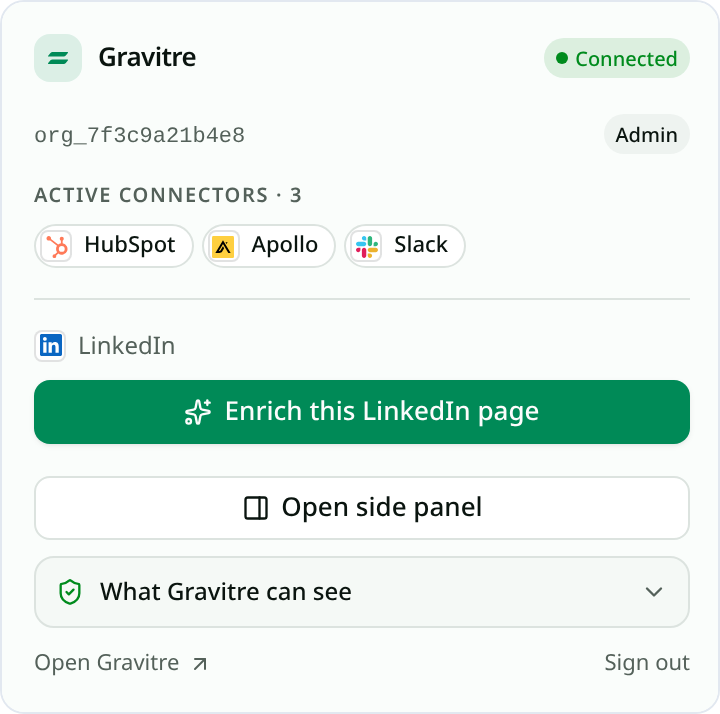
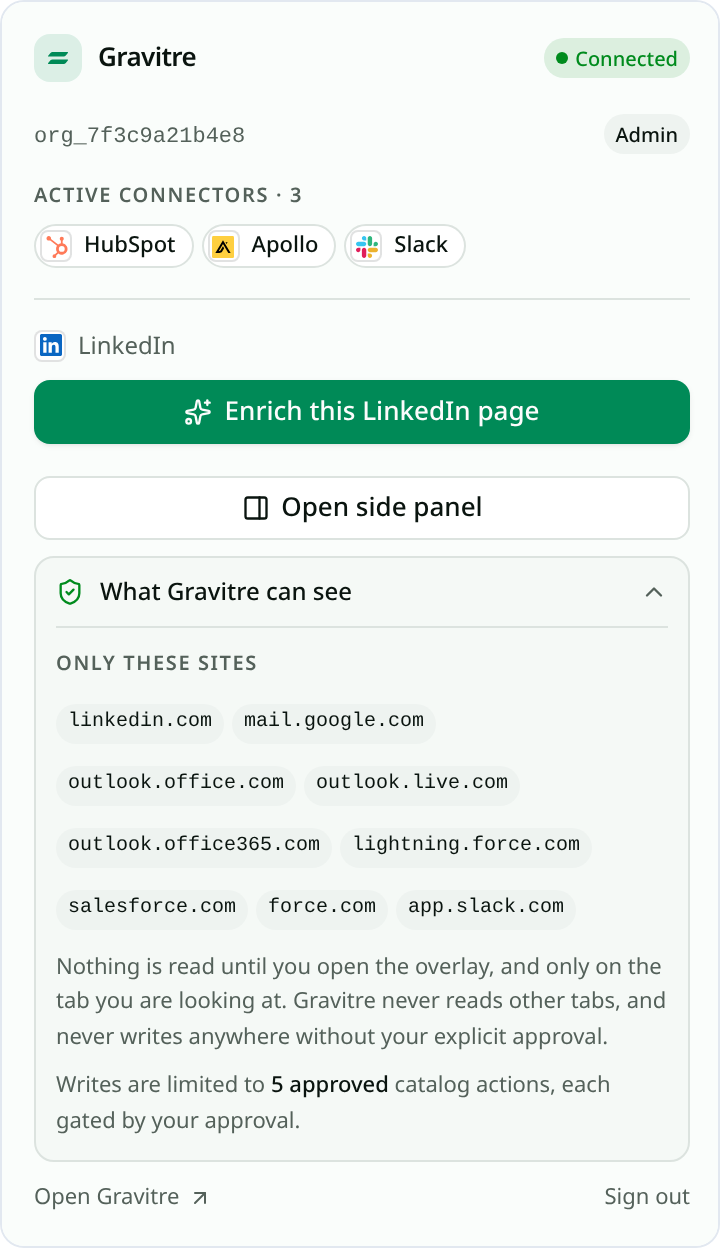
A connected popup shows the org id you authorized and your role, plus the connectors currently active for it. Check the org id here before enriching — it is the org every read and write will be attributed to.
If connect fails: confirm you opened Connect from the extension (so ext_id is present), you are signed in, and an org is selected.
First value — enrich and approve a write
- Connect Apollo and/or HubSpot under BUILD → Connectors (
/connectors) in the active Environment. - Open a LinkedIn profile (or Gmail / Outlook / a company page).
- Use the overlay (or popup → Enrich) — Gravitre runs catalog reads from page context.
- Choose a suggested write (e.g. create contact / create list) → Approve.
- Open Outcomes / Runs — the run should show
source=browser_extensionand a completed notification fanout.
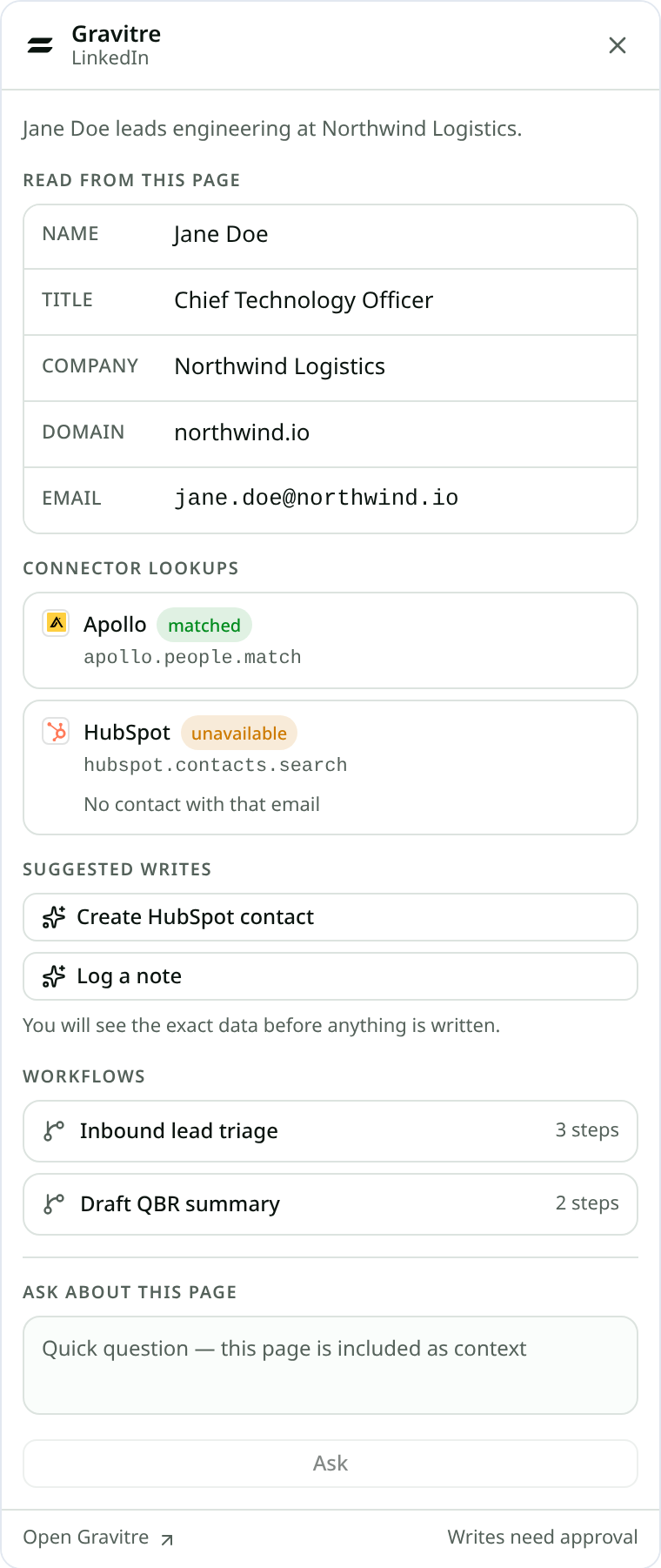
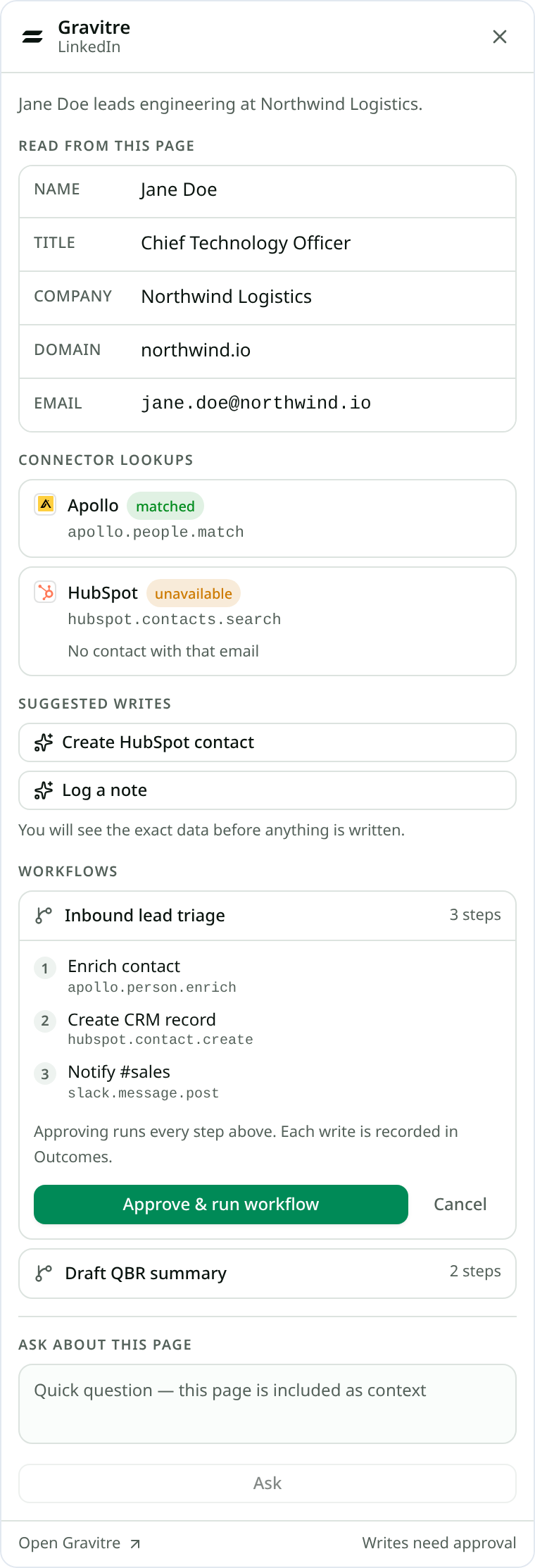
The overlay separates what it read from the page from what each connector
returned, so a missing result is legible rather than mysterious — below,
Apollo matched but HubSpot came back unavailable with the reason.
Choosing a suggested write does not write anything yet. The overlay first shows the exact field-by-field payload and the catalog action it will call, and the footer stays pinned to Writes need approval:
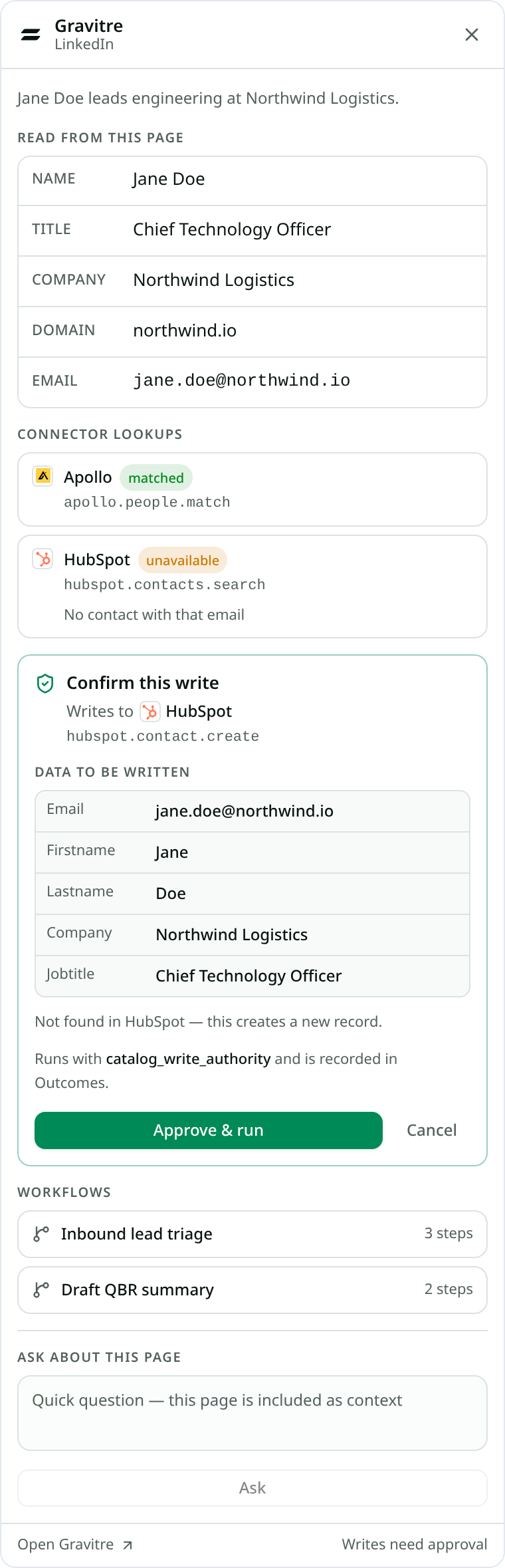
That sequence is the product “aha”: the write is the same governed path as chat, not a parallel automation stack.
Optional — the side panel
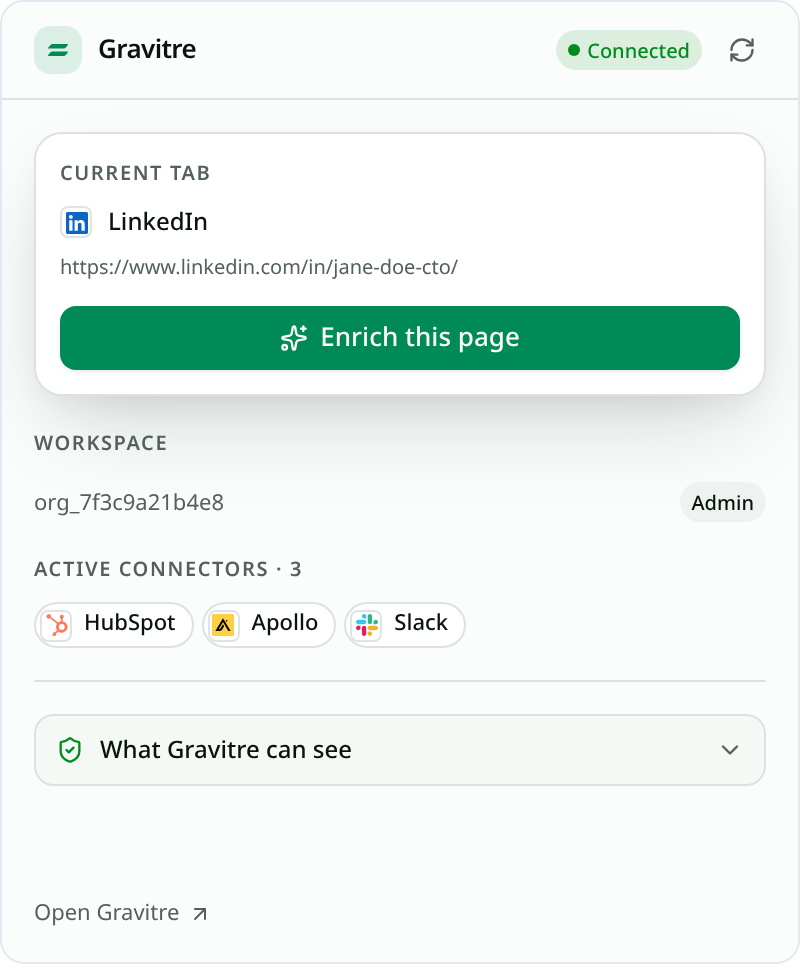
If you would rather keep Gravitre docked than open the overlay on top of the page, use Open side panel in the popup. It targets the current tab only and runs the same governed catalog path — it is a different placement, not a different engine.
Permissions (why we ask)
| Permission | Why |
|---|---|
| Host allowlist (LinkedIn, Gmail, Outlook, Salesforce, Slack, Gravitre) | Overlay + API only on named hosts — each host added explicitly |
activeTab | Company-site overlay when you invoke it |
storage | Session token + org id |
scripting / sidePanel | Inject overlay / optional side panel |
We do not request debugger, <all_urls>, or background crawling.
You can audit this yourself at any time — the popup's What Gravitre can see panel lists the exact hosts and restates the read and write limits:
Trigger a workflow from the overlay (v3)
The overlay can list active typed-contract workflows and run them through the same execute path as chat (plan steps → approve → Outcomes). It does not invent new workflow logic in the extension.
- Open the overlay on a supported page.
- Under Workflows, pick an active multi-step workflow.
- Review the plan steps (same shape as chat’s plan bar).
- Approve & run — confirm uses the server token; execution is the shared engine path.
- Open Outcomes for the run — full step chain,
source=browser_extension.
Expanding a workflow shows every step and the catalog action behind it before you approve, so “3 steps” is auditable rather than opaque:
Live example (production tip verify): workflow MSP NVD CVE Lookup completed with steps nvd.cve.get + cisa_kev.feed.get — run 139fd6cc-7d53-4dfd-ac1b-c59e902109ea.
Ask about this page (v4 overlay chat)
The overlay includes a short Ask about this page box. It calls the same unified-turn / execute_task_streaming path as main Gravitre chat, with page context passed in as data.
Inline (quick): fact questions grounded in the page (name, title, company).
Handoff: write intents, long threads, or multi-step plans (≥3 steps — same threshold as the main-chat progress panel) open full Gravitre chat at /ai?c={conversationId} (same conversation). The overlay does not duplicate that progress panel.
It is not a second reasoning stack and not a place to approve complex connector plans — use Continue in Gravitre when the overlay says the request needs the full app.
Live transcript proof: conversation cc618049-… — overlay page-context answer + write handoff stub, both persisted before opening the full app.
Troubleshooting
| Symptom | Check |
|---|---|
| “Not signed in” | Popup → Connect Gravitre; complete /extension/connect |
| Enrich empty / no suggestions | Connector connected + healthy in the same Environment |
| Write blocked / no token | Approve only after the server returns needs_confirmation + token |
| Wrong org data | Confirm X-Org-Id org in the web app matches the one you authorized |
| Overlay missing on LinkedIn | Hard refresh; confirm extension enabled for the site |
| Workflow stuck / conflict | Another run may be active for that workflow — open Runs, cancel or wait, retry |
Platform names (IA)
If older docs mentioned Command Center, Agent Swarm, or Apps, use current names: Gravitre AI, Multi-Agent Run, Connectors. See FAQ — renamed surfaces.
Related
- Approvals
- Monitor Runs
- Connect integrations
- Product page: Browser extension